Tradecopia Alternative: For MT4, MT5, cTrader and TradeLocker, Not Futures
Trepeat repeats your own trades across MT4, MT5, cTrader and TradeLocker accounts, each sized its own way, and where Tradecopia, a futures copier, fits instead.
Updated 15 Nov 2026 · 4 min read
On this page
Trepeat is a trade copier for accounts you already own. You trade one source account on MetaTrader 4, MetaTrader 5, cTrader or TradeLocker, and a repeater places the same opens, closes and partial closes on your follower accounts, each sized for that account, from the cloud, with no VPS, no Expert Advisor and no terminal left running. If you are weighing it against Tradecopia, the first question is which market your accounts trade, and the table below starts there.
| Compared | Trepeat | Tradecopia |
|---|---|---|
| Platforms | MetaTrader 4, MetaTrader 5, cTrader and TradeLocker, copied in any direction. | Futures platforms, including Tradovate, NinjaTrader and Rithmic. |
| Account types | Currently demo accounts, the kind prop-firm evaluation and funded accounts run on: MetaTrader demo servers, and cTrader and TradeLocker demo accounts. A live account is refused at connection. | Check their site. |
| Billing | $15 per account per month, or $165 a year, tax included. Every connected account counts, the source account too, from 2 accounts. Every feature, journal and alerts included, and unlimited repeaters. | Three versions: desktop, browser, and browser on a dedicated VPS. Check their site for prices. |
| Trial | Try every feature free for 1 week on up to 3 accounts across cTrader and TradeLocker, in any mix, so you can copy between the two. MT4 and MT5 connect as soon as you subscribe. | Check their site. |
Trepeat has no affiliation with Tradecopia. Read Tradecopia's own site for what it offers today.
Every copier we have compared, in one table: compare trade copiers.
See it work
One trade, copied to two follower accounts
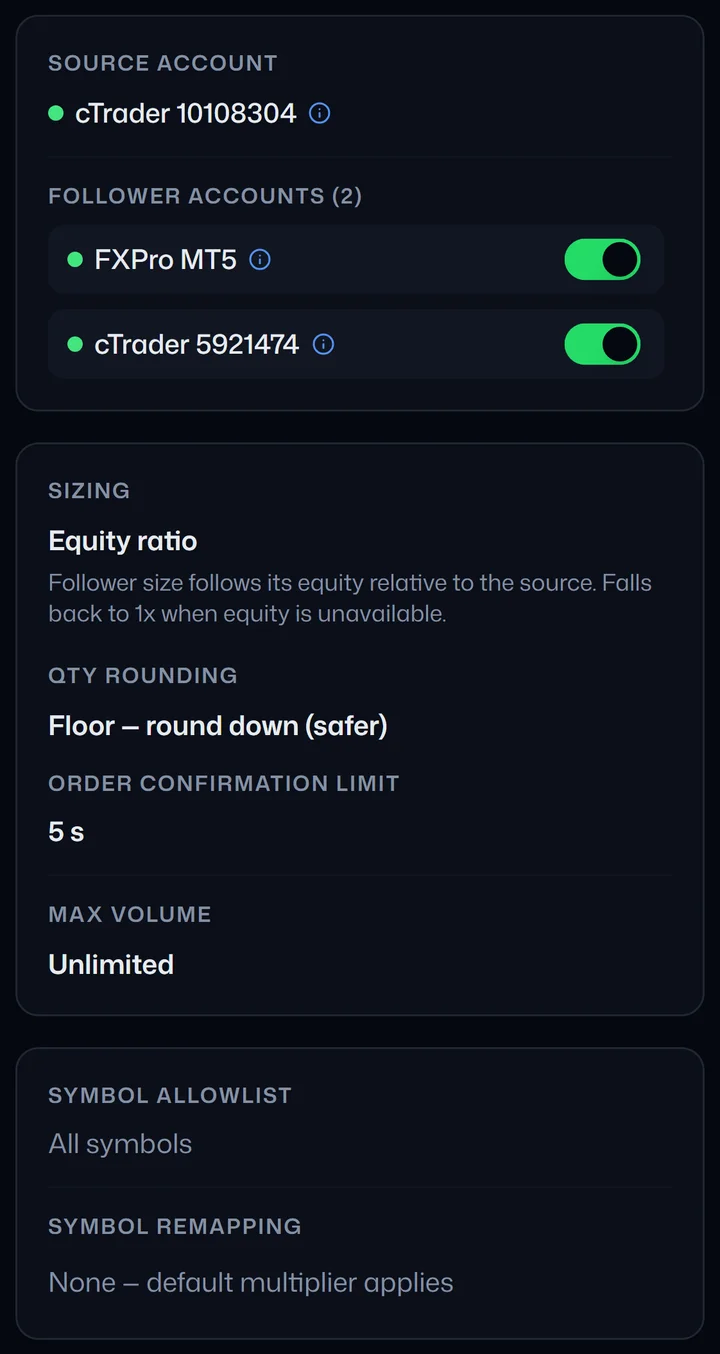
1. One source account, two follower accounts. The repeater's sizing rule gives each follower its own size, so the two do not trade the same lot. 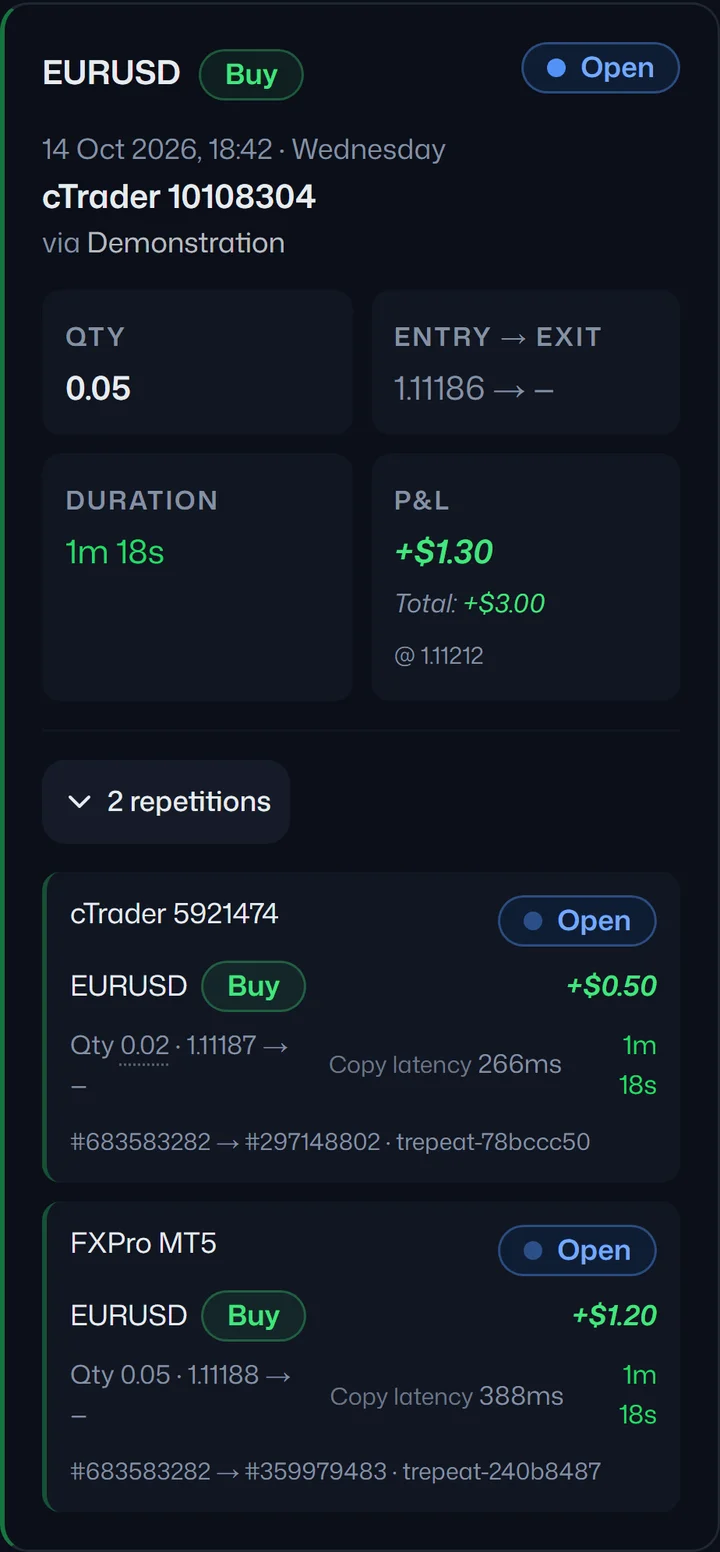
2. The entry. You place a trade on the source account. It appears on both follower accounts, each at its own size. 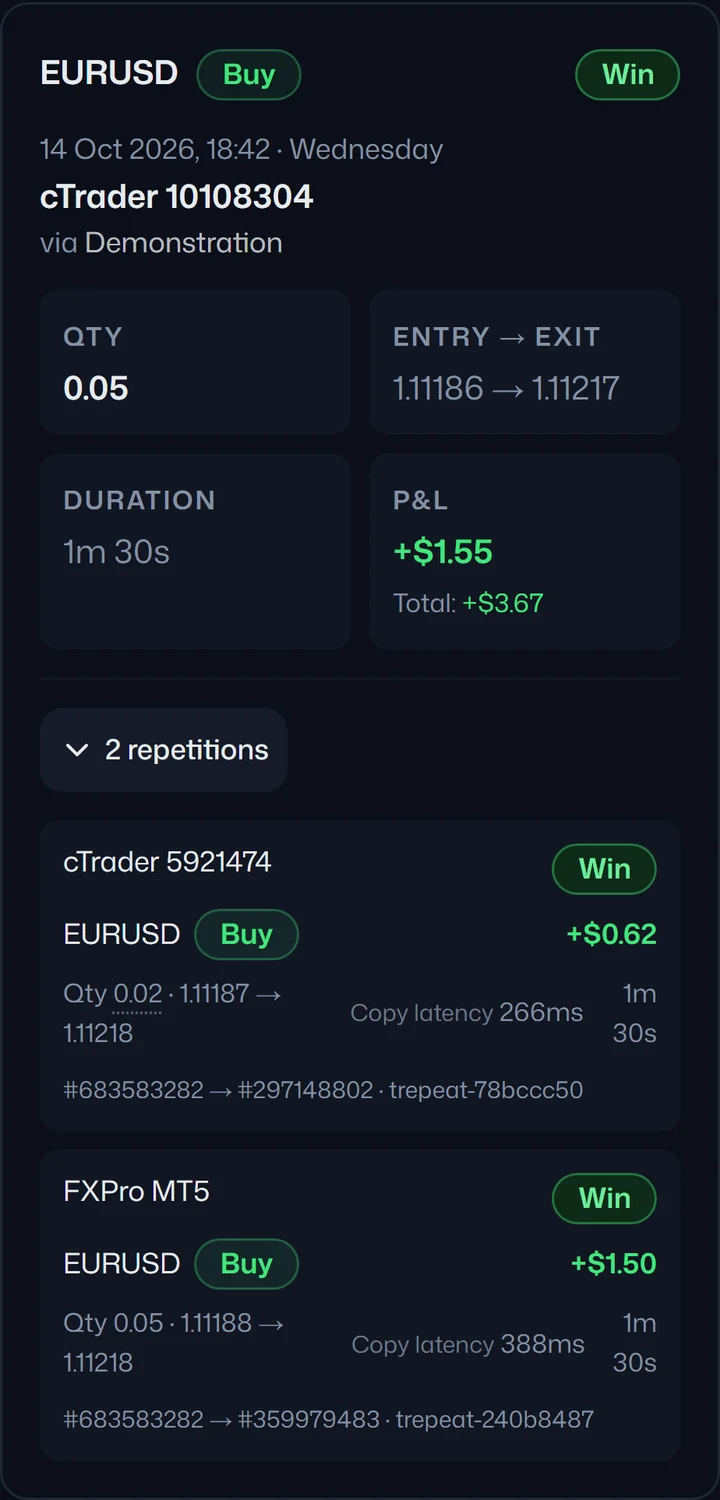
3. The close. You close the trade on the source account. Both copies close with it. 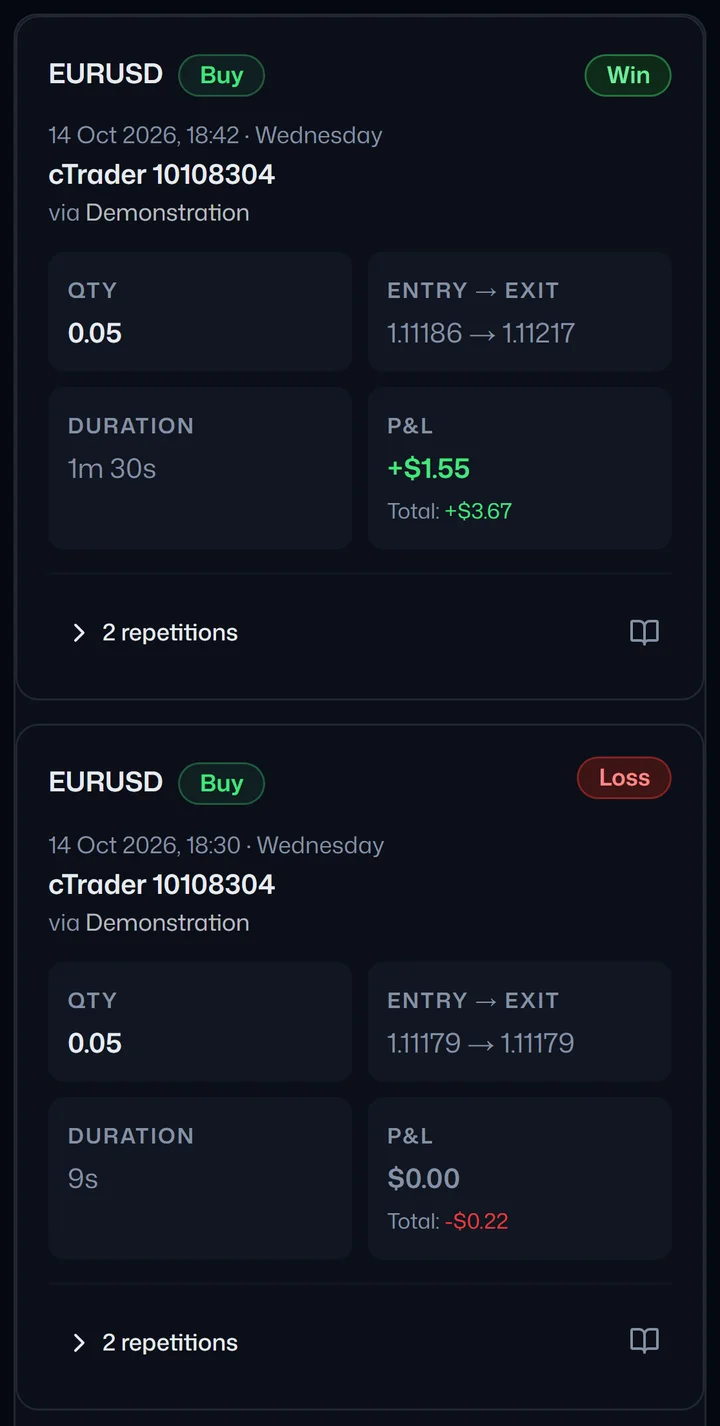
4. The record. The Trades page keeps every run, wins and losses alike, and each one opens to show its copies, their sizes and copy times.
One real run on demo accounts. Sizes and times are from that run and are not a promise about yours.
What Trepeat copies, and between which accounts
Trepeat connects MetaTrader 4, MetaTrader 5, cTrader and TradeLocker accounts and repeats across them in any direction: a cTrader source can drive MetaTrader followers, or the reverse, or any mix of the four. On cTrader you sign in with your cTrader ID, so a password is never shared. Copying between MetaTrader and cTrader covers what crosses the boundary and what does not.
Brokers rarely spell an instrument the same way: a suffix, a space, a hash, or another name for gold entirely, so each repeater carries a symbol allowlist, which limits what is repeated, and symbol remapping, which turns the source broker's name into the follower broker's before the order goes out. You set both once; after that a mismatched name is a decision you made, not a copy that quietly failed. Symbol mapping across brokers lists the patterns to expect.
Each account sized its own way
Sizing belongs to the repeater rather than to a global setting, so a small account and a large one off the same source each take a lot that fits them. Within one repeater an equity ratio already sizes every follower to its own equity; to give two followers different rules, put them in separate repeaters on that source.
- Fixed multiplier: the source lot times a number you choose: 0.5 for half, 2 for double.
- Equity ratio: the follower lot follows the ratio of the two accounts' equity when both use the same deposit currency (otherwise the multiplier applies), and keeps following it as either account grows or draws down.
- Max Volume: a ceiling on each follower order, applied after the sizing rule.
- Rounding mode: Floor, Round or Ceiling, to the follower symbol's own volume step, with Floor as the default so a copy never lands above the size the rule meant. A volume off the broker's step is refused, so this decides whether the copy fills.
Position sizing when copying trades works through what each rule does on each pair of accounts, with the arithmetic.
Why Trepeat is the better fit for MetaTrader, cTrader and TradeLocker accounts
- Nothing to install or keep running: Trepeat runs in the cloud. You Run and Stop a repeater from the web app or your phone, and repeating carries on whether your own machines are on or off. See cloud vs local trade copiers.
- Your manual trades stay yours: every order Trepeat places carries its own stamp, and its automatic closes only ever touch those copies. Flatten closes the source trade and every copy of it. Trades Trepeat isn't copying are never touched.
- One failing follower does not stop the rest: a follower that disconnects or errors is paused on its own while the others carry on. Once it reconnects, unpause it in the repeater's settings (or press Run if the repeater stopped); if the source drops, the repeater stops.
- Alerts that name the broker's reason: a copy that does not land raises an alert saying what the broker reported, instead of a gap you find at the end of the week.
- Live P&L and a record of every close: open positions valued as prices move, per account and per repeater, and each close recorded as repeated, made by hand in the terminal, or a Flatten.
- Your own accounts only: journal, alerts and trade history in one subscription, no share of anything, and no money moves through Trepeat: every account stays with its own broker, in your name.
Where Tradecopia fits better
- You trade futures. Trepeat does not copy futures and connects no futures platform. It works with only MetaTrader 4, MetaTrader 5, cTrader and TradeLocker. If your accounts are futures accounts, Trepeat cannot serve them, and a futures copier such as Tradecopia is the place to look.
- You need live real-capital accounts. Trepeat currently refuses a live account at connection, on MetaTrader, cTrader and TradeLocker alike. Evaluation and funded accounts issued on a MetaTrader demo server or as a cTrader or TradeLocker demo account connect like any other: check the account type, not the funded label.
Whether a copier is permitted on a given account is set by that account's own paperwork: your broker's terms, or the rulebook of an evaluation or funded programme. Trepeat does not read, interpret or enforce those rules. Is copying your own trades allowed covers the clauses that usually matter. Nothing here is legal advice.
Switching without copying twice
Two copiers on one follower account would place two copies of every trade. Move your accounts over in this order:
- Write down what Tradecopia does today: how each follower is sized, and any symbols it renames or leaves out. In Trepeat those become the repeater's sizing, symbol remapping and symbol allowlist.
- Turn Tradecopia off for those accounts first, so no follower gets the same trade twice. Trades Trepeat isn't copying are never touched, so close any copies Tradecopia left open yourself, or switch when none are open.
- Connect your accounts in Trepeat: the source account and the follower accounts.
- Create the repeater with one follower first: the source, that follower and a small size.
- Run it, and check the copy on the Trades page. Only trades opened while the repeater is Running are copied, so a position already open on the source is not.
- Add the remaining followers once that copy looks right.
If your accounts are on MetaTrader, cTrader or TradeLocker and you want each one carrying the same decisions at its own size, connect one source and one follower, place a trade, and judge it within a session.
Start free trialFree trial on cTrader and TradeLocker · 1 week · up to 3 accounts
MT4 and MT5 connect as soon as you subscribe.